
Build Visually With Nodes
Build your workflow visually by connecting prompts, reference images, and generation nodes on one board. See how every step works together and change any part without rebuilding the rest.
AI Workflow Canvas
Turn your AI creation process into one connected visual workflow. Combine prompts, reference images, and leading image and video models, explore multiple directions at once, and reuse successful workflows instead of rebuilding them from scratch.
Free to start. No credit card required.
What You Get
Bring your entire creative process onto one visual board. Connect prompts, references, image generation, and video generation into workflows you can build once, refine, and reuse.
Build your workflow visually by connecting prompts, reference images, and generation nodes on one board. See how every step works together and change any part without rebuilding the rest.

Turn generated images directly into videos without breaking your workflow. Connect one generation to the next and keep creating without exporting and re-uploading between steps.

Branch from the same prompt, reference, or generation to explore multiple creative directions at once. Compare different outputs without rebuilding the same setup for every variation.

Bring Dropshot AI's image and video models into the same connected workflow. Choose the right model for each step without moving between separate generation screens.

Start with a ready-made workflow instead of building every connection from scratch. Duplicate a template, customize it for your project, and start generating faster.

Duplicate any Canvas into your workspace and customize it for new projects. Save workflows that work and reuse them whenever you need to create something similar.
Specialized Tools
Not every shot needs a prompt written from scratch. Dropshot AI has built-in tools to help make your image and video creation easier and faster.

Sharpen images and videos in one click.

Make clean cutouts with no background.

Turn one photo into a character sheet.

Mirror the motion and facial expression.

AI product shots, no model needed.

Be the star with Seedance 2.0.

See one scene from nine camera angles.

Choose a character and create fun scenes.

Turn photos into motion videos.

Make anyone look younger or older.

Create stunning 360° product rotation videos.

Create product shots from a single shot.

Professional food visuals from menu text.

Create a hand shot with no hand models.

Generate hyper-detailed close-up images.

The Process
Set up a reusable pipeline in three steps. No coding required.
Go to Canvas and choose a ready-made template to get started quickly, or open a blank Canvas to build your own workflow.
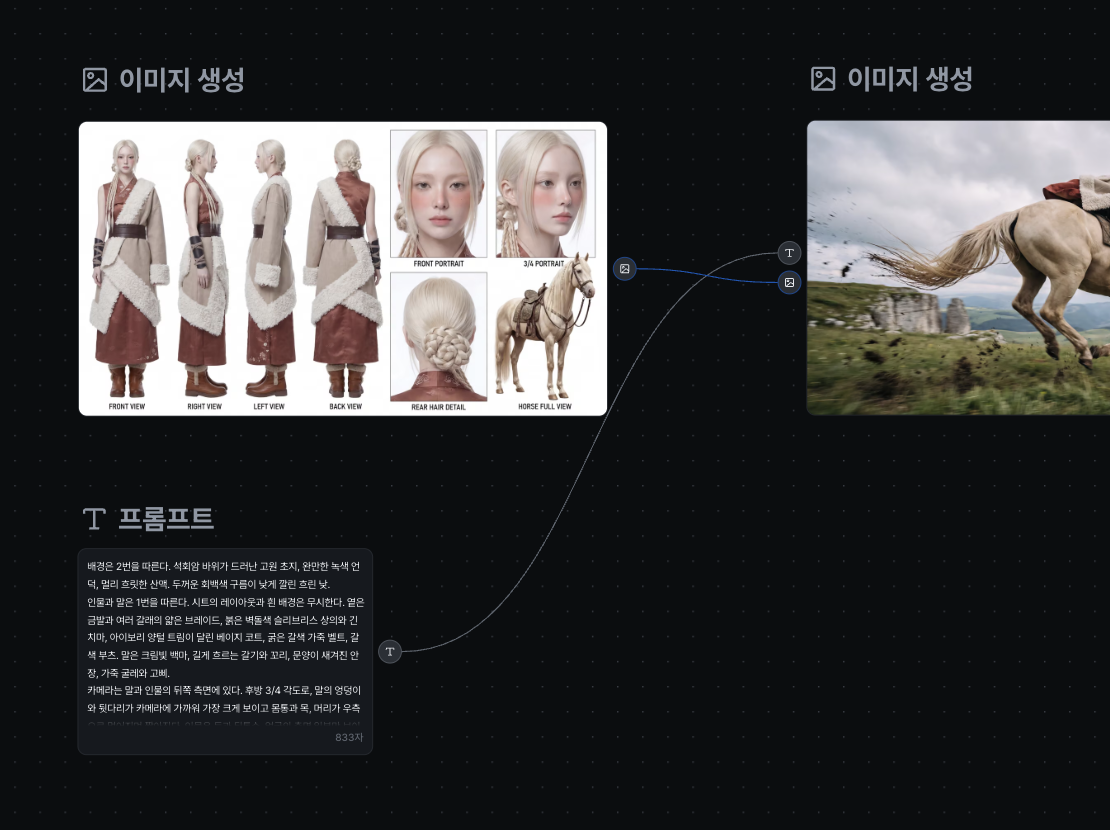
Add prompt, reference image, Generate Image, and Generate Video nodes, then connect them in the order you want the pipeline to run.
Duplicate the canvas into your own workspace, run the pipeline, and branch off new variations from any node.
See Pricing
Join 480,000+ creators already making with Dropshot AI. Every plan unlocks Canvas, plus every other tool and model.
A beginner-friendly plan for AI creation
 3,000Credit /month
Monthly max generations
 Nano Banana 2.1176
 Seedance 2.5Draft mode11
 Grok Imagine Video23
 All image, video, and audio modelsSeedance 2.5
 GPT Image 2.0
 Kling 3.0Commercial use allowed
The best value plan for your AI creation
8,000Credit /monthMonthly max generations
2.6x LiteNano Banana 2.1470Seedance 2.5Draft mode31Grok Imagine Video61All image, video, and audio modelsSeedance 2.5GPT Image 2.0Kling 3.0Commercial use allowedSmart plan, stress-free creation
24,000Credit /monthMonthly max generations
3x PlusNano Banana 2.11,411Seedance 2.5Draft mode93Grok Imagine Video184All image, video, and audio modelsSeedance 2.5GPT Image 2.0Kling 3.0Commercial use allowedOur top plan, with everything included
55,000Credit /month Unlimited Benefits
Monthly max generations
2.2x ProNano Banana 2.13,235Seedance 2.5Draft mode213Grok Imagine Video423All image, video, and audio modelsSeedance 2.5GPT Image 2.0Kling 3.0Commercial use allowed


From The Blog
Practical tips for prompting, character consistency, and getting realistic results across every model on Dropshot AI.


Access dozens of image and video models, including Nano Banana Pro, GPT Image 2.0, Seedance, and Grok Imagine, all in one workspace. Compare models side by side and find the one that's right for you.
Yes. Create a reference image once, and you can reuse it as is in every scene that follows to keep the face, hairstyle, and body proportions consistent. There's no need to describe the character from scratch every time.
Text-to-image starts from a written description alone. Image-to-image starts from a photo you upload, where you describe what to change and leave the rest as is. It's useful for restyling a scene or moving the same subject into a new one.
You can generate up to 4096×4096 (4K) native resolution straight from your prompt. No separate upscaling step required.
Yes, on every plan, including the free trial. Everything you generate is cleared for commercial use, with no extra licensing and no watermarks.
Yes. New sign-ups get free credits to generate images and try out the workspace, and no credit card is required. Paid plans offer more credits and higher usage limits as you need them.
No. Everything happens through plain text prompts. What matters most isn't experience with software, but describing exactly what you want.
No. Dropshot AI runs entirely in your browser. There's nothing to install and no hardware requirements to meet — just open it and start.
Need Help?
Free to start. No credit card required.